
















Wireless Telemetry Radio Base Station (T24-BSi)
.jpg&w=800&h=500&hash=36012170ead547e9298af827f42b0b83)


View more videos on
Our
YouTube Channel !
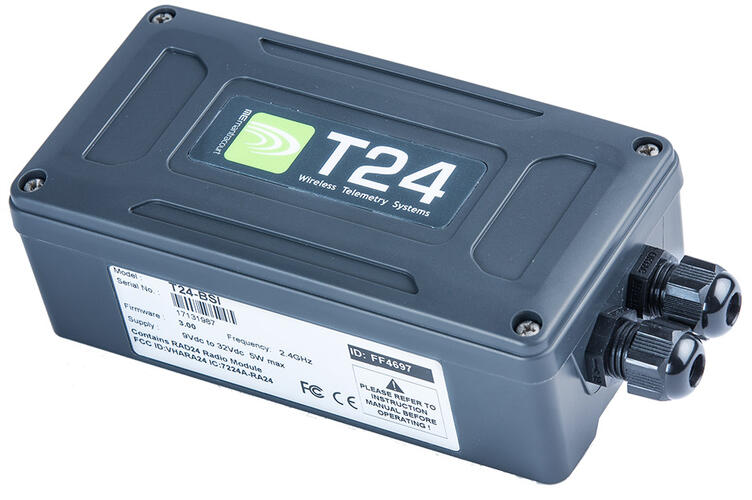
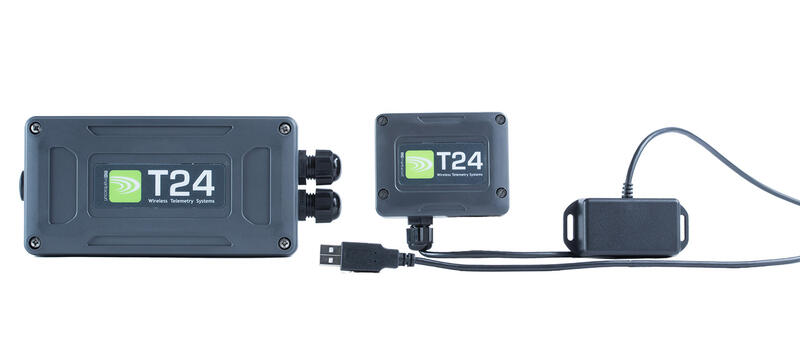
- Base station with USB, RS232 & RS485 interfaces
- Collects data from and configures any T24 radio telemetry module using wireless
- Wide range power supply
- Wireless range of up to 800 m (2,600 ft)
- Integral antenna
- Waterproof to IP67
The industrial wireless telemetry base station T24-BSi can be used for the configuration of all of the T24 modules which is greatly simplified by the T24 Toolkit software for Windows & supplied free of charge. Data can also be captured by the wireless base station from an unlimited number of T24 transmitter modules & streamed to a PC to function as a radio telemetry data logger.
Click here to view & download associated free software.
The options of USB, RS232 or RS485 interfaces enables this wireless telemetry base station to connect to a wide range of devices such as PCs, PLCs, OEM hardware etc. The internal PCB antenna provides up to 800 m (2,600 ft) range.
For software developers a standard Windows DLL and COM driver are available to enable data collection from T24 transmitter modules.
The licence free 2.4 GHz direct sequence spread spectrum (DSSS) radio telemetry technology offers high integrity, error free communications which can co-exist with other wireless technologies such as Wi-Fi, Bluetooth® and Zigbee®. ETSI, FCC and IC approvals.
*Maximum range achieved in open field site at height of 3 metres (9.8 feet) above ground

Documents
- T24-BSi Product Sheet : Wireless Telemetry Radio Base Station
- T24 Telemetry User Manual : T24 Wireless Telemetry User Manual (12 MB)
- Bluetooth Enabling T24 Modules : Describes how to use an LM Technologies LM048 Bluetooth RS232 Adapter to connect T24-BSi, T24-GW1 and T24-SO modules via Bluetooth.
- T24 Base Station Comparison : T24 Base Station Comparison
Software
- T24 Toolkit : This toolkit allows configuration, calibration and testing of the T24 range of 2.4GHz telemetry products.
- 100 Channel Logging & Visualisation Software (T24LOG100) : For use with up to 100 channels using T24 range of sensor transmitters, view, log and browse data on demand, set visual and audible alarms. Graphics and mapping capabilities. Customised branding available. Allows remote viewing via webserver.
Product order options
| T24-BSi | Code |
|---|---|
| Industrial Base Station | T24-BSi |
These are the following industries and applications in which this product has been used:
- Civil Engineering - Wireless Monitoring of Anchor Loads
- Marine - Centre of gravity control for boats under construction
.jpg&w=125&h=125&far=1&bg=FFFFFF&hash=1711ba7c6b556a61226fdc75e85b428c)
Wireless Sensor Transmitter IP67 Enclosure
.jpg&w=125&h=125&far=1&bg=FFFFFF&hash=3bad5dd2ba4192732cfad891a90a89c9)
.jpg&w=125&h=125&far=1&bg=FFFFFF&hash=41a6e2f5f80e1b0deb04842f729a79a0)
Wireless Sensor Transmitter IP50 Enclosure
.jpg&w=125&h=125&far=1&bg=FFFFFF&hash=0847c92f4a03775cdf22aa4bd5d196d3)
- Q: Can base stations integrate to other communications protocols?
A: With the use of the .DLL and COM driver provided with the T24 Tool Kit, users can create tunnelling between the data provided by the base station, to the PC, and another communication protocols.
- Q: Once a transmitter module has been configured, will it require regular connections to the base station?
A: No. Once a transmitter module has been configured it will remain stable for its lifetime providing its operating limits are not exceeded.
- Q: What is the function of the USB and the industrial T24 base stations?
A: Both provide users with a PC interface by which collect data from any transmitter module with in range and configure all devices in the T24 range.
- Q: How is the industrial base station different to the USB base station?
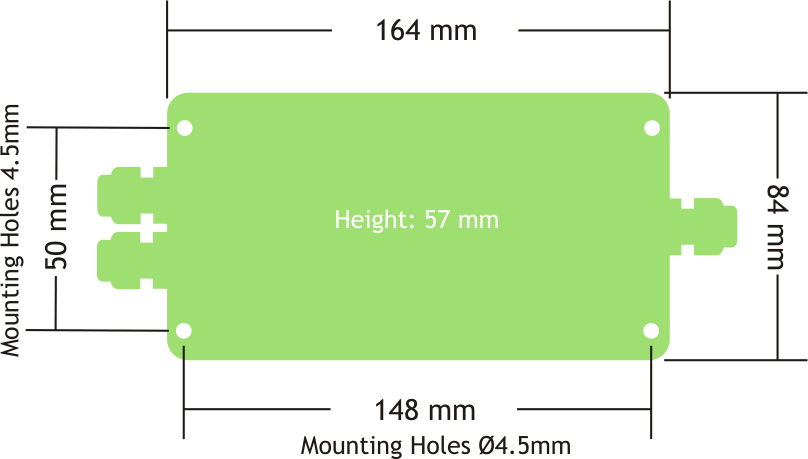
A: The industrial base station provides not only USB interface but also RS232 and RS485 at multiple baud rates. This module can also be DIN rail mounted.
- Q: How many transmitter modules can be acquired by the base stations?
A: Each base station can use one of 15 channels. From that selected channel a base station can collect data simultaneously from any number transmitter modules depending upon the frequency of readings being provided by the transmitter module.
- Q: What is the difference between the T24-SO Serial Output and T24 Base Stations?
A: The T24-SO gathers data from up to 8 transmitter modules and, on its serial output, provides a user configurable ASCII string. The output string can contain the summed value of the gathered data. This output can be used to drive serial displays, printers or to simply feed directly into a PC, PLC or other data transmitter systems.
The base stations communicate bi-directionally so are used to configure the devices as well as gather data. The communications protocol is binary and packet based and so requires processing to present the data to the application in a formatted manner.- Q: How many T24 transmitter modules can be controlled by one USB base station at the same time?
A: Transmitter modules are not controlled when providing data, rather data is provided at a user determined rate during configuration set up. The base station can gather data from any number of transmitter modules providing they are on the same channel. The number of modules a single base station can process depends upon the frequency of transmission from the transmitter modules that channel.
- Q. What protocol does the T24-BSI use on the RS232 and RS485 outputs?
A. These use a Mantracourt proprietary protocol.If you require a Modbus RTU or ASCII output you will need to use the T24-GW1
- Q. Can I connect multiple base stations to one PC?
A. You can only have one T24-BSu or T24-BSue connected to any one PC.There are more complex setups possible with the T24-BSi. You will need to download the appropriate DLL driver file to enable this to happen.
- For more 'Frequently Asked Questions' please see our Knowledge Centre